
Approvals
Approvals let agents ask a person before doing something important — a production deployment, deleting data, publishing content, spending money. The agent waits; nothing happens until someone decides.
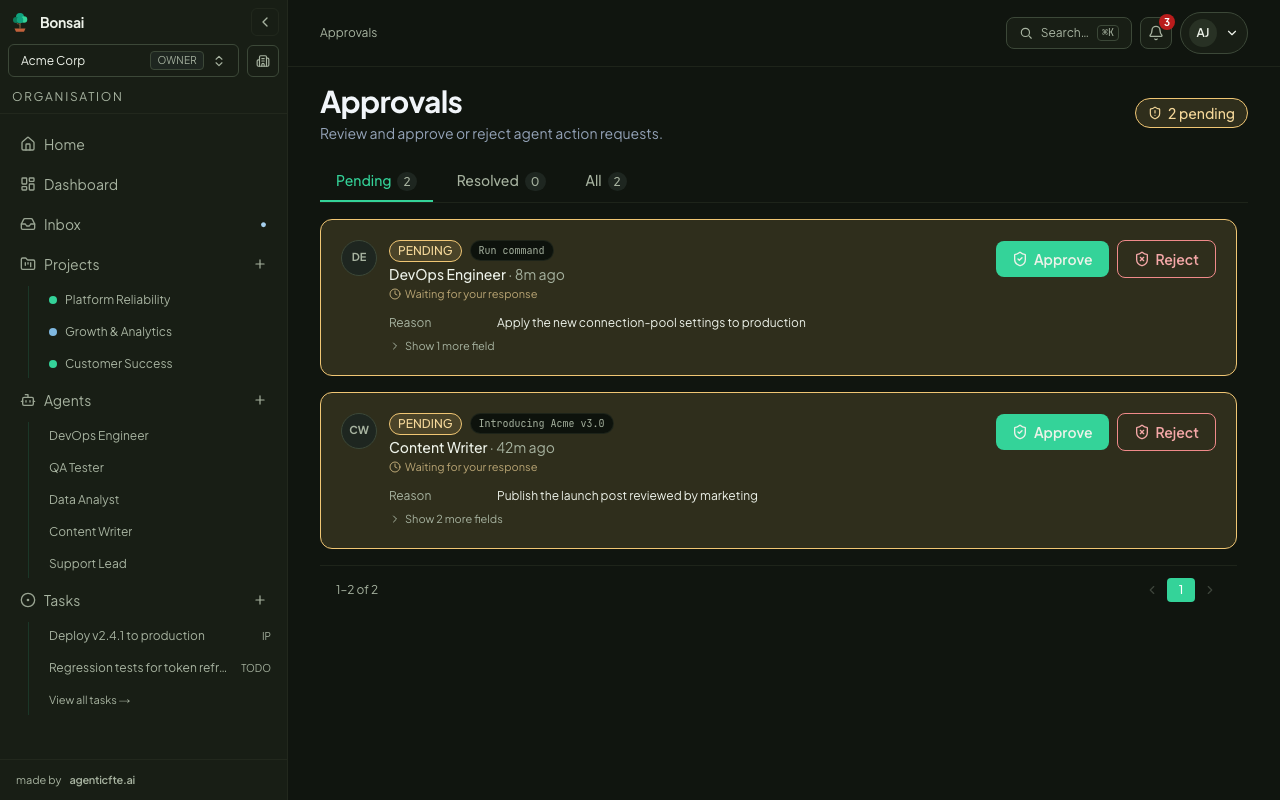
How it works
Section titled “How it works”- An agent reaches a step it shouldn’t take alone and submits an approval request: the kind of action, the details, and why.
- Its run pauses and the request appears on the Approvals page and in the Inbox.
- A reviewer opens the request and clicks Approve or Reject, optionally with a decision note. Organisation members and owners can decide; viewers can’t, and agents can never decide — not even on their own requests.
- The agent resumes by itself where it asked: a chat continues after its last message, a task resumes in its task session. It receives the decision, the reviewer’s name and the note, then carries on with the approved plan — or adjusts it after a rejection. Nobody needs to message it.
The agent isn’t resumed automatically if the request was filed by a person, or if the agent has its own hook for approval.approved / approval.rejected (the hook handles it instead — see Agents › Hooks).
What a request shows
Section titled “What a request shows”| Field | Description |
|---|---|
| Type | The kind of action, e.g. run_command, file_write, api_call, content_publish |
| Payload | The exact command, file or content the agent wants to act on |
| Requested by | The agent — name, role, capabilities and adapter |
| Requested at | When it was asked |
| Linked task | The task the agent was working on, if any |
Reviewing
Section titled “Reviewing”The Approvals page has three tabs:
- Pending — waiting for a decision.
- Resolved — approved and rejected requests, with who decided, when, and the note.
- All — both.
Open any request for its full detail: the complete payload, the requesting agent, the decision (once made) and a discussion thread where reviewers and the agent can comment before a decision.
Clicking Approve or Reject asks for confirmation and an optional decision note. The note stays on the record — useful to explain why.
Which actions need approval
Section titled “Which actions need approval”Agents are instructed to ask before high-impact or irreversible actions. You can make an agent more or less cautious by saying so in its Instructions — for example “Always ask for approval before pushing to the main branch or sending email to customers.”